Bolt and Nut
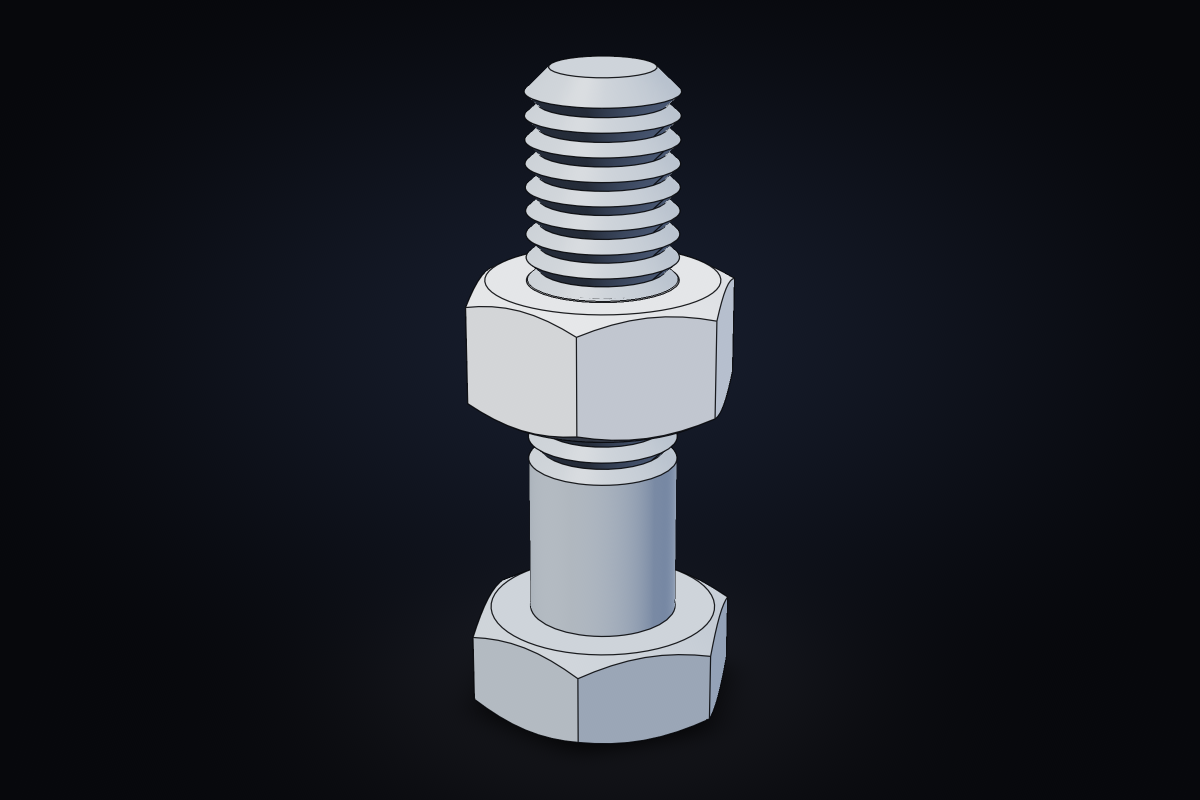
ISO-style hex bolt and nut, sized from the metric thread table. The hex heads get the classic 30° chamfer by intersecting the prism with a double cone; the shank is a single revolved profile with cosmetic V-grooves for the thread.
examples/bolt-and-nut.tsx on GitHub
bunx tscad dev examples/bolt-and-nut.tsx/**
* ISO-style hex bolt and nut, sized from the metric thread table. The hex heads get the classic
* 30° chamfer by intersecting the prism with a double cone; the shank is a single revolved
* profile with cosmetic V-grooves for the thread.
*/
import { defineParams, type ParamValues } from "tscad"
/** ISO 4014/4032 dimensions: thread Ø → [pitch, across-flats, head height, nut height]. */
const METRIC = {
M3: [0.5, 5.5, 2, 2.4],
M4: [0.7, 7, 2.8, 3.2],
M5: [0.8, 8, 3.5, 4.7],
M6: [1, 10, 4, 5.2],
M8: [1.25, 13, 5.3, 6.8],
M10: [1.5, 16, 6.4, 8.4],
M12: [1.75, 18, 7.5, 10.8],
} as const
export const params = defineParams({
size: { type: "choice", default: "M8", options: Object.keys(METRIC) as (keyof typeof METRIC)[], label: "Thread" },
length: { type: "number", default: 30, min: 8, max: 120, step: 1, unit: "mm", label: "Shank length" },
grooves: { type: "boolean", default: true, label: "Cosmetic thread" },
gap: { type: "number", default: 12, min: 0, max: 60, step: 1, unit: "mm", label: "Nut position" },
})
/** A hexagonal prism with both ends chamfered at 30°, standing on z = 0. */
function ChamferedHex({ acrossFlats, height, z = 0 }: { acrossFlats: number; height: number; z?: number }) {
const R = acrossFlats / Math.sqrt(3) // circumradius
const r0 = acrossFlats * 0.475 // chamfer starts just inside the flats
const r1 = R * 1.05 // ...and clears the corners
const c = (r1 - r0) * Math.tan(Math.PI / 6) // 30° chamfer
return (
<intersection z={z}>
<extrude height={height}>
<regularPolygon sides={6} flats={acrossFlats} />
</extrude>
{/* a barrel with 30° conical ends: cuts the chamfer at both ends of the prism */}
<union>
<cone r1={r0} r2={r1} h={c} />
<cylinder r={r1} h={height - 2 * c} z={c} />
<cone r1={r1} r2={r0} h={c} z={height - c} />
</union>
</intersection>
)
}
export default function BoltAndNut(p: ParamValues<typeof params>) {
const d = Number(p.size.slice(1))
const [pitch, af, headH, nutH] = METRIC[p.size]
const L = p.length
const r = d / 2
const depth = 0.54 * pitch // ISO external thread depth
// The whole shank is ONE revolved profile (radius, height): a plain length under the head,
// then a row of 60° V-grooves (cosmetic rings, not a helix), then a chamfered tip.
const threadLen = p.grooves ? Math.floor((L * 0.7) / pitch) * pitch : 0
const z0 = headH - 0.5 // sink into the head so the union fuses
const zt = headH + L - threadLen - pitch // thread starts here
const profile: [number, number][] = [[0, z0], [r, z0], [r, zt]]
for (let z = zt; z < headH + L - pitch * 1.5; z += pitch) profile.push([r - depth, z + pitch / 2], [r, z + pitch])
profile.push([r, headH + L - pitch], [r - pitch, headH + L], [0, headH + L])
return (
<assembly name="fastener">
<part name="bolt" color="#9aa3ad">
<union>
<ChamferedHex acrossFlats={af} height={headH} />
<revolve>
<polygon points={profile} />
</revolve>
</union>
</part>
<part name="nut" color="#c9ced4" z={headH + p.gap}>
<difference>
<ChamferedHex acrossFlats={af} height={nutH} />
<cylinder r={d / 2 - pitch * 0.3} h={nutH * 3} z={-nutH} />
</difference>
</part>
</assembly>
)
}